Understanding HTML Tags and Elements

What HTML is and why we use it ?
HTML (HyperText Markup Language) serves as the skeleton or structure of a webpage, organizing content and providing which design (CSS) and interactivity (JavaScript) are built. It uses tags to define elements like headings, paragraphs, images, and links, allowing web browsers to interpret and display the information correctly.
Its Is the standard language for creating the structure of web pages, using a system of tags and elements to define content types like headings, paragraphs, images, and links for web browsers. It acts as the fundamental building block of all websites, enabling the organization and display of web content.
Analogy you can use:
HTML = skeleton of the body
CSS = clothes and styling
JavaScript = brain and movement
What is an HTML tag?
A tag is a keyword wrapped in angle brackets.
Example:
<p>
This is called an opening tag.
The closing version adds a slash:
</p>
Between them, you write the content.
<p>Hello world</p>
<p>= opening tagHello world= content</p>= closing tag
Tag vs Element (important difference)
Tag = just the angle bracket part
Example:<p>or</p>Element = opening tag + content + closing tag
Example:
<p> Hello world </p>
Self-closing (void) elements
Some elements don’t have content and don’t need a closing tag.
Examples:
<br>
<img src="image.jpg">
<hr>
These are called void elements because nothing goes inside them.
Block-level vs Inline elements
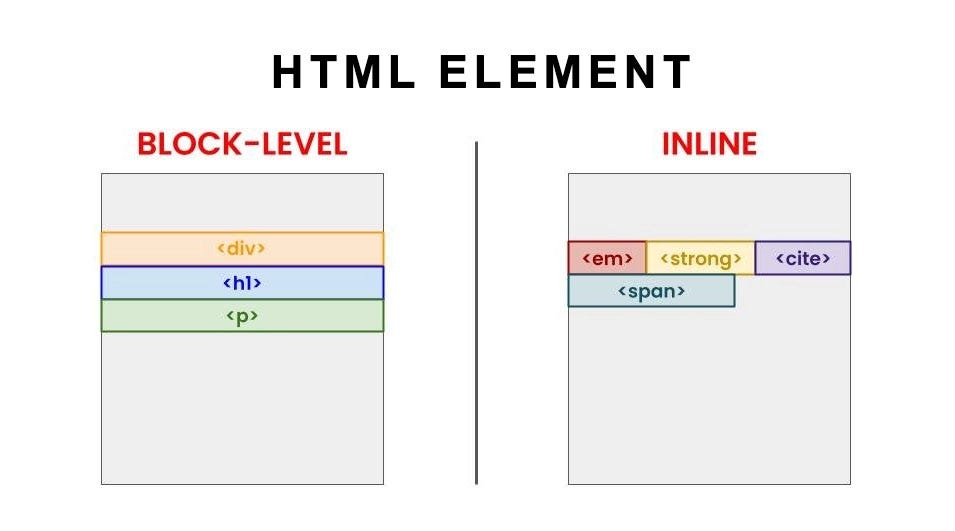
Block elements take full width and start on a new line
Examples:
<div>...</div>
<p>...</p>
<h1>...</h1>
Inline elements stay in the same line and only take needed space
Examples:
<span>...</span>
<a>Link</a>
So
<p>Hello</p><p>World</p>
appears on two lines.
But
<span>Hello</span><span>World</span>
appears on the same line.
Commonly used beginner tags
<h1>Main Heading</h1>
<p>This is a paragraph.</p>
<div>This is a container.</div>
<span>This is inline text.</span>
<a href="#">This is a link</a>
<img src="photo.jpg" alt="photo">
<br>
<hr>
h1toh6→ headingsp→ paragrapha→ linkimg→ imagediv→ block containerspan→ inline containerbr→ line breakhr→ horizontal line